How to lock down the computer via keyboard
Posted in : Maintenance | Posted by : Cristina Mailat
August 7th, 2008 | No comments
ID USB Lock Key is a security program meant to protect your computer from unauthorized users. It denies access, by providing a security block-screen which can be unblocked with the USB stick where you have the key generated by the program. You can download a 14 days trial version or you can get your hands on license on the safe order page.
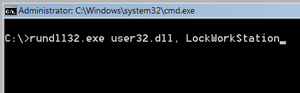
How to lock the computer via the Keyboard (Windows XP/Vista Only)
The easiest way to lock Windows XP is by simply pressing the Windows logo key and the letter L (for Lock) on a Microsoft Natural Keyboard or any other compatible keyboard that includes the Window key. Doing so will pop-up the Unlock Computer Password box. Look on the bottom row and to the left of the spacebar on your keyboard. Do you see a key with the flying Windows logo? Depending on your keyboard you might also have one to the right of the spacebar.
How to lock the computer via the Windows Security Screen (Windows 2000/XP/Vista)
Users running Windows 2000, Windows XP or Windows Vista can lock their computer using the Task Manager.
Step 1 - On your computer keyboard, press the <Ctrl+Alt+Delete> keys at the same time.
Step 2 - The Windows Security window should appear.
Step 3 - Click the Lock Computer option or button to LOCK your computer.
Step 4 - You will see a pop-up window displaying the Unlock Computer Password Box.
You can also use the following keyboard shortcuts with a Microsoft Natural Keyboard or any other compatible keyboard that includes the Windows logo key and the Application key.
Windows logo key - Display or hide the Start menu
Windows logo key+L - Lock the computer
Windows logo key+BREAK - Display the System Properties dialog box
Windows logo key+D - Show the desktop
Windows logo key+M - Minimize all windows
Windows logo key+SHIFT+M - Restore minimized windows
Windows logo key+E - Open My Computer
Windows logo key+F - Search for a file or folder
CTRL+Windows logo key+F - Search for computers
Windows logo key+F1 - Display Windows Help
Windows logo key+R - Open the Run dialog box
Windows logo key+U - Open Utility Manager
Fastlink2 Launches Internet ID Security Suite
Posted in : Maintenance | Posted by : Cristina Mailat
January 3rd, 2008 | No comments
The ID Security Suite, developed by Fastlink2, provides solutions to a myriad of security issues that plague both business and home computer applications by offering a wide array of software packages designed to protect PC users from unauthorized use or outside intrusion.
ID Security Suite provides low cost solutions to Internet security issues that plague home and business computers. The company, Fastlink2, recognized that there is a desperate need for PC protection from a variety of forces that would attempt unauthorized access to gain information from company or home computers. Consequently they have developed a suite of applications that will protect computers from hackers, spy-ware, unsolicited invasions and a variety of other internal or external threats to computer file security.
Encryption, password access, protection of critical files, computer optimization and maintenance as well as protection and security tools have been developed by the programmers at Fastlink2.
Headquartered in Leverkusen, Germany, the staff has applied their technical expertise to develop simple, efficient programs that provide users with an array of software to address any security threats that are being faced. These software programs are characterized by user-friendly interfaces and installation wizards that enable all users from the novice to the professional to take maximum advantage of the numerous features that are provided.
Many of the software applications features file recovery modules and also have erase features that prevent the hard disk from being searched for deleted files. Additionally, password protection and encryption features prevent unauthorized access to privileged information.
In addition to the ID Security Suite, Fastlink2 maintains a forum which can respond to specific user questions and they offer product support and Internet updates for their complete line of software.
Visit http://www.idsecuritysuite.com for more details or contact Cristina Mailat directly.
Download the press kit containing:
- press release in doc and pdf format
- applications screenshots and artworks
Click here to download the English press kit.
Top 10 Phishiest Countries in Year 2007
Posted in : Maintenance | Posted by : Cristina Mailat
December 19th, 2007 | No comments
Based on our intern data from ID AntiPhishing we have tried to establish a Top 10 Phishiest Countries in 2007. We have correlate our data with the data provided in Netcraft Toolbar and we have created a statistic for year 2007. Personally my biggest surprise is the position of Israel and Koreea. The good surprise is the low position in this “top”for Romania.
| Country |
Total sites reported |
Phishing incidents found |
% of known phishing sites |
Incidents to sites reported ration |
| Israel |
70106 |
88239 |
23.9 |
1 in 0 |
| Korea (South) |
1495720 |
37327 |
10.1 |
1 in 40 |
| China |
2494770 |
24170 |
6.5 |
1 in 103 |
| Russian Federation |
713199 |
18832 |
5.1 |
1 in 37 |
| Romania |
100559 |
11703 |
3.2 |
1 in 8 |
| Mexico |
115727 |
8499 |
2.3 |
1 in 13 |
| Turkey |
388997 |
7424 |
2 |
1 in 52 |
| Thailand |
116203 |
4879 |
1.3 |
1 in 23 |
| India |
140401 |
3744 |
1 |
1 in 37 |
| Kazakhstan |
5723 |
2780 |
0.8 |
1 in 2 |

Keeping your children safe on the internet
Posted in : Maintenance | Posted by : Cristina Mailat
December 18th, 2007 | 1 comment
The children of today have opportunities past generations could only dream of. The movies of the past have become the reality of today. With the advent of the internet, children are now able to bring the world closer to them, develop friendships across the globe, and having instant information at their fingertips. With this technology also come concerns for the children’s safety. The best way to keep you children safe is to use parental controls. ID Parental Advisor can oversee your child while they surf the net, keeping them safe and out of harms way.
The internet provides plenty of action and fun for kids. It lets them keep in touch with friends; do research for school projects and purchase games and books online. The children of today view the internet as a normal part of every day life.
The internet is also an important tool for communication, gathering information, entertainment, and yes even shopping. In today’s world, developing online skills is important to your child’s overall development. These skills are critical for the future success of your child, when they go off to university, or enter the job market.
However, for parents, keeping their children safe is of the utmost importance. The first thing you should do is sit down and talk with your child about the internet. Let them know you are there to guide them and make sure their surfing safely. Encourage them to ask you questions if they are uncertain about a site they have landed at, or the conversations they are having with their new internet friend.
For the majority of children the internet experiences will be safe, but nothing in life is 100% safe all the time. That is why adding ID Parental Advisor to you computer is important. It is impossible for you to be watching your children the entire time they are busy surfing the net. Not only do you have other tasks you need to get done; you want kids to feel you have a degree of trust in their ability to use the internet safely.
ID Parental Advisor can be there for your kids when you are not. Once you configure it, it will be their watching over your kids as they enjoy the freedom of the internet. It will block access based on the criteria you have set up. It will also log activity so you can quickly see where your kids are going.
We don’t want fear to stop us from letting our children access the internet. It is an incredible source of information, allowing children to learn more and learn quicker than any other time in history. Because surfing is fun and enjoyable, kids tend to retain this information much better, then when they are forced to read a text book or listen to a teacher drone on. As well, because of the presentation of the information and the easy access, kids are likely to be taken from one topic to another related topic, expanding their knowledge and understanding.
In the past, pen pals were found by placing an ad in a magazine or paper. Sometimes two schools would initiate a pen pal swap between classes. Today the kids can very easily have friends all over the globe. They can chat with them using instant messaging, they can learn about their culture, and groups of them can all chat together.
Of course in every silver lining, there is a cloud. This is where pedophiles and evil minded people who pray on children like to gather. They pose as another child or an adult companion building trust with the child. ID Parental Advisor can keep tabs on your child’s online friends, alerting you to any potential problems. With ID Parental Advisor you can give your kids the freedom to build a network of friends and know they are safe.
Online gaming has also become quite popular. Online gaming involves interactive play with many players from all over the world. The level of available gaming ranges for games for the very young to very advanced games that both teens and adults enjoy. They can either play by visiting the site, or by downloading the game to their computer. This is another great way for the kids to meet people and have some fun. With your parental controls set to keep an eye on the kids, you can be sure they are not signing up to inappropriate gaming sites.
By using ID Parental Advisor, you can be sure that your children have a valuable and pleasant experience online. It will allow you to control content and contacts. The software will also allow you to block or filter the material that comes into your computer. It will monitor where your child has been, and who your child has been chatting with. ID Parent Advisor will allow you to control what shopping sites they are able to visit and set privacy levels. Having ID Parental Advisor on your system is like having a dedicated internet nanny for your children!
How to stop pop-ups?
Posted in : Maintenance | Posted by : Cristina Mailat
December 18th, 2007 | No comments
Pop-ups are an extra window which opens on your computer screen without asking you. We’ve all seen them on our screens. They can be quite annoying and many people frown on them as a form of spam. Pop-ups have become quite prolific on the internet, ranging from being a minor annoyance to being a major annoyance. There are several reasons why a pop-up is used, advertising being the most common. The best way to block pop-ups is to use a pop-up stopper like ID AntiPopup.
A variant of a pop-up is the pop under. This is the same type of intrusive window but rather than appearing on top of the screen you are working on, it appears behind it. It lurks in the background until you close all windows on top of it. The hope of the pop-under is that you will not recognize it, and that you will fall for it without realizing what it is. Although it may not seem as intrusive, it is rather devious!
When you use a pop-up blocker, it prevents the new window from opening automatically, eliminating these annoyances from your screen. Some of the browser toolbars provide limited protection from pop-ups. The best way to stop these annoying pop-ups is to use ID AntiPopup. It is a great choice with superior blocking capabilities.
There are also pop-up killer programs. The pop-up killers are much more aggressive allowing no second windows to open. This creates problems for anyone that may want to have more than one browser or browser window open at the same time. A standard pop-up blocker is more convenient for most users.
Pop-ups can also occur as messenger service advertisements. If the title bar reads Messenger Service with gray ads appearing on your screen out of nowhere, this will be a messenger service pop-up, more commonly referred to as messenger spam.
Don’t confuse this with MSN’s Instant Messenger. They are not the same. In Windows NT, 4.0, 2000, and XP the messenger function was designed to broadcast messages across a network. Previously it was quite popular, but these days, email is used more often. If you are not connect to a network, the messenger function is useless
Some spammers have decided to abuse this open port by sending pop-ups through. Imagine ones surprise when your browser is closed, you are busy working in your program, and this pop-up appears on your screen. Windows 95, 98, and ME do not have this problem. The best way to rid yourself of this spam is to increase the security on your system.
Adware and Spyware also create pop-ups on your browser. These are usually powered by malware, utilizing activex controls. They not only waste band width, they pose a security risk to your personal information which could be transmitted to someone else without you knowing.
To stop these annoying pop-ups and ensure your personal information stays safe you should only connect to the internet if you are protected by a firewall and anti-virus software. You can also increase the settings in your browser so that activex won’t automatically run. Keep your windows updated and use software like ID AntiPopup to block unwanted pop-ups.
The majority of computer users operate under a windows operating system which is extremely vulnerable to pop-ups. Running the Linux operating system is another way to avoid those nasty pop-ups. The disadvantage to Linux is it is not a user friendly platform, and the average user finds it is too complicated.
How many pop-ups you get also depends on which browser you are using. If you are using Internet Explorer be prepared for a barrage of pop-ups. Use the ID AntiPopup to control this annoying spam.
Opera and Mozilla both have a built in option for blocking pop-ups which can be used stand alone, but are best used in conjunction with an aftermarket pop-up blocker. Safari, the browser for Apple computers, also has a built in pop-up blocker, that works best when combined with an aftermarket blocker.
Another way to avoid pop-ups is to limit the sites you visit. Stay away from sites that you don’t recognize or that have a reputation as being non-reputable. Of course this may not be that easy to accomplish. When you’re surfing the net, it’s pretty hard to determine who is going to throw pop-ups at you and who is not.
Pop-up blockers allow you to configure them to meet your personal needs. You can turn them completely on or off with the click of a button. If you visit a site where you want to see a pop-up, you can allow the pop-up from just that site. You can set it to allow pop-ups from a certain site always, or just for one occurrence. They provide plenty of flexibility.
So if you are tired of those annoying pop-ups, install ID AntiPopup on your system. It’s like having your very own advertising police!
How to remove viruses?
Posted in : Maintenance | Posted by : Cristina Mailat
December 18th, 2007 | 1 comment
As people spend more and more time online, the risk of getting a virus increases. It happens to all of us at some point in time. If you are not able to detect viruses and remove viruses immediately, your computer system could come crashing down. That’s why you need to use a good anti virus software program, like Eset Nod32 to keep your computer virus free.
You turn on your computer, pick up your mail, and then your worst nightmare comes true. Your computer has just been given a deadly virus that’s erasing your hard drive. You quickly call your computer tech. As you are explaining what happened, your hard drive is being wiped out sector by sector. You get that gut wrenching feeling in the pit of your stomach, because you know you are about to have a “really bad day!”
This whole scenario could have been avoided if you had been running an antivirus software. You know there’s no excuse for not running an anti virus program. You’ve heard it on the news, read it in the paper, and see the warnings on line all the time. You just didn’t think it would happen to you.
Believe me when I say these hackers don’t care who they strike. Rich or poor, young or old, corporations or individuals, we are all targets. The mission of those that deliver viruses is to seek out and destroy. Their sick minds find this an amusing game that hurts innocent people along the way.
Don’t be a victim a second time, take the necessary steps to keep your computer virus free. There are some simple steps you can take, but remember without a good piece of virus software you are still at risk. These steps will simply lower the risk of getting a virus.
Before you can protect yourself you need to understand what a virus is. A virus is a piece of code written to create a negative affect. They can be attached to a program or a file. Most often they are disguised as being something positive. It’s only when you open them that you discover you’ve just been infected.
Since viruses can attach themselves to files you download off the internet, be sure you know what you are downloading and that the company you are downloading from is trustworthy.
If you are putting a floppy disk or CD in your drive or receiving attached files via email be sure you know they are from a reliable source.
If at all possible do not open file attachments with an exe or vbt extension. Watch the email subject header. Many of the most deadly viruses come in the form of an email with a pleasant header: Happy Birthday, Congratulations From Me. If you do not know who the sender is, do not open an attachment. In most cases, as long as you don’t open the attached file you will be safe. If it looks suspicious simply delete it.
The best way of making certain your computer is safe from viruses, is to install antivirus software. The antivirus software is like hiring a personal body guard for your computer. Antivirus software quickly identifies virus files, and either denies the download, or quarantines the file instantly.
Your antivirus software will keep watch over all files that are placed on your computer. It will scan your hard drives, floppy diskettes, CDs, files that you transfer, and email attachments to make sure you are virus free. If your virus software finds a virus during its regular scan it will either delete it or quarantine it to prevent the infection from spreading. How it handles the virus will depend on your choices during configuration.
If you are running antivirus software but not updating it daily, then you are going to become outdated very quickly, and once again be at risk to getting a virus. If possible, configure your antivirus software to do automatic updates. If this is not an option than you must update your software every day!
Don’t fall for hoaxes. Almost all of us have received one of those emails that say, “I’m sorry I have infected your computer, to get rid of virus x delete this file.” Most come with specific instructions. The problem is, most of these hoaxes have you delete a file that windows uses, so if you follow their directions you could cause your computer to crash. If you receive one of these messages, run a quick check on the internet to find out whether it is valid or a hoax.
Learn to back up regularly. Prevention is the best medicine. Running anti virus will keep you 99% safe, but there is always that 1% chance something might still go wrong. So back up your operating system and important data on a regular basis. If you do a lot of work on your computer or store lots of important data files. It would be a good idea to back these up daily. That way if you are hit by a virus, you will be able to get your system up and running much quicker.
Don’t you think it’s time to give your computer the protection it deserves? Check the Nod32 review and decide for yourself.
How to erase your internet traces?
Posted in : Maintenance | Posted by : Cristina Mailat
December 18th, 2007 | 1 comment
In today’s high tech world it seems anything we want is only a keystroke away.
Sadly this is the same for the crooks out there. Every time you use your computer you leave files behind that can be stolen by a hacker. Often, these files will contain personal information. To protect privacy and stay secure, you will need to use a trace washer, which will erase traces of all your internet activity.
With the click of a button, or a few keystrokes we can now make instant purchases half way around the globe. The world of information has arrived at our desk. Convenience is right at our finger tips. But with that convenience comes some risks. In the electronic age we live in, everything from our credit card information, to our medical information is stored on a computer somewhere.
Large companies are fully aware of the security risks, and are constantly working to enhance their security measures. These companies have full teams of IS staff dedicated to keeping your information secure. Large budgets allow for the purchase of only the best security equipment. Still, even they experience the wrath of a hacker. We often hear on the news of a major corporation who has had our personal information exposed or stolen from their systems, causing the security of our personal information to be compromised.
The home user often doesn’t give security much thought. Many incorrectly people believe they have nothing on their computers that a hacker would want. This is simply not true!! The home user is more at risk than any of the large companies, because they are not prepared. Home users are a hackers dream. Information is readily available with virtually no security to infiltrate.
Each time you connect to the internet your risk your privacy. Even when you use a firewall and anti-virus software you still run the risk of your privacy being compromised. Firewalls and anti virus software do the job they were designed to do very well, but there is other security protection needed to keep you personal information safe. That is why it is so important to use ID Privacy Shield.
ID Privacy Shield will provide you with enhanced privacy protection for all of your online surfing. You can feel secure in knowing that ID Privacy Shield is on the job. ID Privacy Shield will delete temporary files off your computer, clear the cache, delete cookies, and remove all traces of files that could compromise your personal information.
Your computer stores more information that you might think. Every email you send, every file you open, and every site you visit is recorded somewhere on your computer. It could be in the registry, the cache, temp files, or a host of other places. It could even be in a hidden file.
If you are thinking you are safe because you empty the recycle bin, clear your cache and delete your cookies after every use, think again. You are as vulnerable as you were before deleting those files. A file that has been deleted manually is only deleted from your view. It still resides on your computer, leaving a trace behind that can easily be restored by a hacker, compromising your personal information. A few key windows commands will very quickly uncover your habits, your files, and your personal information.
Each time you access the internet small packets of files are left behind on your computer. Think of these packets as bread crumbs that build a trail. These small packets, or bread crumbs build a trail that others can follow to trace your activity. This is why you often hear about some employee getting fired for surfing inappropriate material on the internet. There activity was followed by someone in their companies IS Security department. Even though they deleted the information a few commands by a pro and they were completely exposed.
Many popular programs that we all use on a regular basis, record the users history. Programs such as Netscape, MSN Messenger, AOL, Kazaa, Windows Media Player, Microsoft Office, Internet Explorer, as well as many other programs, track all of your activity by placing files on your system. They do this to provide you with a better user environment, building smarter applications that can know your needs on demand. However, the collection of this information can also put you at risk, because your personal information may be compromised by a hacker.
Don’t become a victim! The only sure way to be safe is to use ID Privacy Shield to sweep up behind you. By using ID Privacy Shield you cover your tracks automatically. It will destroy all data related to your surfing. It’s like sweeping up the trail of crumbs as fast as they land. No more traces of where you’ve visited, logins, or any other personal information.
All traces of your online internet and computer activities will be permanently erased and they will not be recoverable by anyone. Files written to the temporary directory, cookies, registry entries, and files that have been hidden, will all be removed by ID Privacy Shield.
Secure your shredding
Posted in : Maintenance | Posted by : Cristina Mailat
December 18th, 2007 | No comments
All important information, for an individual or firm, must be protected even after they were deleted. Deleted files or formatting the disks is easily recoverable. Sensitive data, such as passwords, financial or health records are at risk. Don’t allow to an unauthorized person to discover it.
You must protect also the banking account information, credit card numbers, social security data, human resource, accounting and other internal documents. The confidential data should be not only safeguarded according to the strict rules, but it should be also completely destroyed when needed.
To protect the security and privacy of your confidential data, you must wipe the hard drive clean with many erase passes that overwrite with varied data, including a low-level format for complete sterilization. Even individuals or firms that have adopted good security practices during the normal life of a computer or only a hard drive may not pay enough attention to security during the repair operations or at the end of a system’s life. Today’s huge hard drives will make quite impossible to overwrite a file with other data. So, the only solution to secure the sensitive data you want to be erased is to delete it for
ever.
Data Wipe removes selected stored information from your hard disk and other memories every day. When you delete a file, empty your Recycle Bin or even format your hard disk, the information is not removed from your computer. These commands only alter the structure of the drive, leaving most of the data intact and recoverable with software tools easily available.
When you delete a file or folder, it goes in the trash or recycle bin. Emptying recycle bin to be sure that the file is deleted forever is not a solution. Only the file’s name is removed from the disk’s index, but data still remain on the disk. Many programs can undelete or recover deleted files successfully.
Overwriting data is not sure enough. Suppose that you can erase the data; what about the file name, location, date and time? They may still be available in system files somewhere, giving the attacker some information on deleted files.
The real way to permanently remove unwanted files and data is to use file shredding software. ID Data Wipe erases magnetic media, overwriting it many times, alternating patterns on order to expose the magnetic media to a magnetic field oscillating fast enough that it does the desired flipping of the magnetic domains in reasonable amount of time. The encoded signal is chosen make the erased data meaningless.
File shredding utilizes an advanced algorithm technique of overwriting your files multiple times so that the information contained in them is no longer readable. ID Data Wipe will destroy the original data for ever. ID Data Wipe ensures file deletion overwriting and erasing data to ensure security. It does it using up to 50 pass data wipe. Data wipe is a user-friendly program, easy to install, especially designed for your day to day shredding need for removing data and files on your computer, for ever.You can delete a file or a folder by a simple click!
You can also put your unwanted files or folders in ID Data Wipe bin on the desktop. They will be instantly shredded. You can shred all temporary files left behind on your computer. One of the most important features will clean your computer from all old deleted files and folders that are still stored on your drives. You can not see them but you can easily recreate every deleted file.
You can have also a qualitative reporting if you need a document for the files which have been permanently removed. ID Data Wipe is designed with tested algorithms that erase data from the media to make it impossible to retrieve.
ID Data Wipe from ID Security Suite is erasing data by wiping its contents beyond recovery, destroying its name and dates and finally removing it from disks. Software and hardware recovery tools from restoring the erased data are stopped using ID Data Wipe that completely destroys any data from previously deleted files that might still be accessible on the hard disk.
ID Data Wipe is deleting event the locked files, index.dat, the swap file and the cookies that track the internet connections. The web browser cache, cookies, temporary internet files, recent document list, the temporary files are cleared automatically by ID Data Wipe, for any capacity hard drive.
The only safe and secure hard disk deletion is the result of ID Data Wipe use. Another major advantage is to have a PC running faster and more efficiently on and offline. You will have maximum performance and full security in less a few minutes. ID Data Wipe deletes all evidence of online activity, erase previously deleted files on disk drive, flash memory and unused disk space so your sensitive data can never be accessed or recovered.
How adware works and how to remove it?
Posted in : Maintenance | Posted by : Cristina Mailat
December 18th, 2007 | No comments
Browser hijacked, strange pop-ups appearing for no reason? Is your computer running really slow? It’s time you knew how to protect yourself!
These days, the adware threat to your computer, is no laughing matter. Not only is it annoying, it can create havoc with your system, and jeopardize your personal information. That is why it is so important to detect adware, and remove adware as soon as possible.
So what exactly is adware? Just as the name indicates, adware is a term used for many different forms of advertising that appear on your computer. Adware is a software application that is programmed to display a banner, a popup ad, or some other form of advertising. When you load a web page it appears. Sometimes it’s quite obvious, other times much more subtle and you have no idea that files or tracking cookies have been placed on your system.
Adware is used by developers to generate revenue. The adware threat to your computer is dependant on what has been coded into the advertising. In some cases it’s simply an annoyance that produces pop-up ads. In other cases the threat is more critical, because the ad has been coded to upload personal information from your computer, or to download information to your computer without your permission. Adware can be as simple as an annoying add, or so serious your personal information is in jeapordy.
Both spyware and adware install files on your computer without you knowing, giving the ability to change advertising campaigns based on your personal surfing habits. Adware downloads to your computer usually involve tracking your movements on the net, and collecting information about you. It’s like a huge survey of where users go and how long they stay. Put bluntly, it is an invasion of your privacy. That is why it is so important to detect adware and remove it immediately. When you remove adware from your system, you remove the ability of the advertiser to follow your movements on the internet.
Malware is also a form of adware and is often seen attached to freeware or shareware software. When you install the software, it generates advertising within the software. This in itself you might be able to tolerate, after all you did get the program for free. But the annoyance and danger run much deeper.
Malware will run even when you are not using the software it came with,. It will collect information and send it back to the originating server, jeopardizing your privacy. Malware can also create system problems. If you computer seems to be running slower and slower, it could be a result of one or more malware programs running in the background. These programs are constantly accessing the internet and using your system resources.
You also need to be aware that most peer to peer file sharing programs come bundled with Adware. Always read the End User License Agreement, to see exactly what you are agreeing to for the privilege of using their software. Too many of us just click yes and have no idea that we have just agreed to their adware campaign.
One of the most common ploys used by software companies is to tell you they need to have a peer to peer connection to provide you with updates, and for their software or website to run correctly. Screensavers are a perfect example of this type of marketing.
Popup ads may not be as malicious but they are extremely annoying. Using a popup blocker will eliminate 90% of these little devils from popping up on your screen. You can use a popup browser provided with a search engine toolbar, but we recommend a more powerful popup blocker.
Some adware is difficult to remove, and in the worst case scenario removing the adware will cause the software to stop operating or your computer to crash or freeze. With other software the removal is easy and does not interfere with any functions.
Ad-aware will keep you and your computer safe. It is a privacy tool that scans your computers memory, the registry, and all of your drives - hard, removable, and optical, for known aggressive, data mining advertising and tracking elements. This includes tracking cookies.
After your system is scanned, the antispyware application will provide you with a list of the results and choices. You can remove or quarantine all or some of the components. Sometimes there will be a reason to keep a specific file or cookie, so Ad-aware allows you to ignore certain files in future scans.
With the growing threat of identity theft, computer hijackings, and other security threats, it’s important that you don’t delay purchasing good adware software. If you don’t want your system overrun with adware, install Ad-aware to keep your system clean and healthy, and your personal information secure!
Encryption and backup must go hand in hand
Posted in : Maintenance | Posted by : Cristina Mailat
December 18th, 2007 | No comments
Whether you know or not, you are a target, an easy target, if you do not take minimum steps to protect yourself when using the internet, when you are making security copies for your essential data.
No law mandates financial institutions encrypt data, but common sense require applying the best security methods. Wasting data is not an option!
Some surveys that said only 7% of companies routinely encrypt their backup data. Recent lost of important tape having unprotected data appears like a disaster. It makes us think more seriously to encrypt the data before the backup and archive phase. The lost of millions of consumers are prompting companies to embrace security technologies they have neglected: encrypt and backup data.
Most businesses copy computer data on backup tapes for storage with third party vendors in the event of a disaster. Few encrypt it, but neglecting the security basic rules is a pure suicide. Shortly after it lost track of essential data for thousand customers, important firms decided to begin encrypting backup tapes.
Too many companies and individuals lose valuable data to hard drive failures, with absolutely no plan in place to prevent this from happening. ID Backup Manager is the best method to ensure the safety and security of your company’s invaluable computer information.
Encryption is the most effective way to achieve data security. Encrypted data (cipher text) must be then archived, making the back up more secure. Nobody would store or send confidential information in the open on a computer ignoring the basic rules of backup security. The only way to secure backup information is to use encryption. To read en encrypted file, you must have access to a secret key or password that enables you to decrypt it.
ID Backup Manager makes it easy to backup your data virtually to any type of storage
media: hard or network drive, DVD, CD-R/W, FTP or LAN.
ID Backup Manager will help you organize your automatic backup. It also featured an intuitive user interface making even the most advanced backup features accessible for beginners and professionals. The backup files are encrypted to make the storage more secure.
ID Backup Manager will encrypt automatically your data before archiving it, simple, straightforward and secure. The ID Security Suite software will encrypt computer files, and store them on your computer safe from viewing by others. The ID Backup Manager is easy to set up and use, have a simple user interface; doesn’t have to be installed at both ends. Special add-ons are provided to facilitate the backup of MS Outlook, system registry and drivers installed in the system. Restoring is as easy as clicking a button, but you can also use a number of advanced options.
Avoid the hassles of disks, tapes or floppies for your backups! Using the ID Backup Manager you’ll have secure encrypted data. Finding and selecting files is easy with our right mouse click options or with the friendly interface. The backup modes are full, differential and incremental; the program works with timestamps and versions.You don’t have to remember to do a security copy for your information. ID Backup
Manager remembers for you.
Our solution is really secure: we encrypt your data with Rijndael algorithm. Data is stored encrypted and only accessible with your passwords. The Backup files are compressed using any of the six compressing methods derived from Zlib, Ppm and Bzip.Compression options are: uncompressed / compressed / compressed encrypted.The ID Backup Manager is offering a large scale of choice for its source: it can backup Application Data Folder, the Desktop Folder, the Windows drivers, the Favorites folder, My Documents folder, Outlook Express Address Book, Outlook Express Emails, System Registry. It cans restore individual files, having an easy to use wizard for choosing which file to be backup.
The program gives you a complete control on the encryption and backup process, logs and reports let you know what was backed up, when it was backed up, and how much storage space you are using. You will receive automated email notification on every successful backup. It cans also schedule the backup at the special time.
You can restore files anytime. In the event of a crash, a virus infection, or a simple user error your backups are a click away. Additionally you have access to your file using your password, without any further intervention.
The new ID Backup Manager combines information security and availability to simultaneously provide word-class security and world-class encryption of your data. This software is designed to keep your business up, running, and growing, no matter what happens.
Imagine how many hours it took to compile the information stored inside tour computer, and think of how many hours of grumbling it is going to take to redo all of that work. With ID Backup Manager, you can leave work with a peace of mind that if your computer system fails, you have everything backed up on another server, or you can simply back everything up on a CD. It takes only a few minutes to encrypt and securely transfer the information to an outside storage source.
If you or your company has information that you just can’t afford to lose, use ID Backup Manager Program!
While very straightforward, ID Backup Manager has all features any PC user, whether a novice or a professional, might need. Good for home or office, this backup program is reliable and easy to use. It has a clear and intuitive interface helping you to walk through the process. Overall, ID Backup Manager is a good choice for any user who wants to keep backup files of sensitive data.
It is very rare to see a software company put so much effort into teaching a user how to use their software. It is extremely easy to learn what ID Backup Manager does and how to use it. This is no small task!
« Older entries -
|